3D & AR for Vending

Don’t let placement objections stall your machine sales

When property managers cannot picture the machine in their space, operators delay the order. Vizbl gives sales teams, dealers, and operators a true-scale 3D & AR catalog that moves the decision forward.

Live demo

Walk around a machine right now

A real 3D model in the same viewer your sales team would use. Spin it with your mouse — or hit the AR button and scan the QR to place it in your room at true scale.

Case study

How VapeTM sells machines with Vizbl

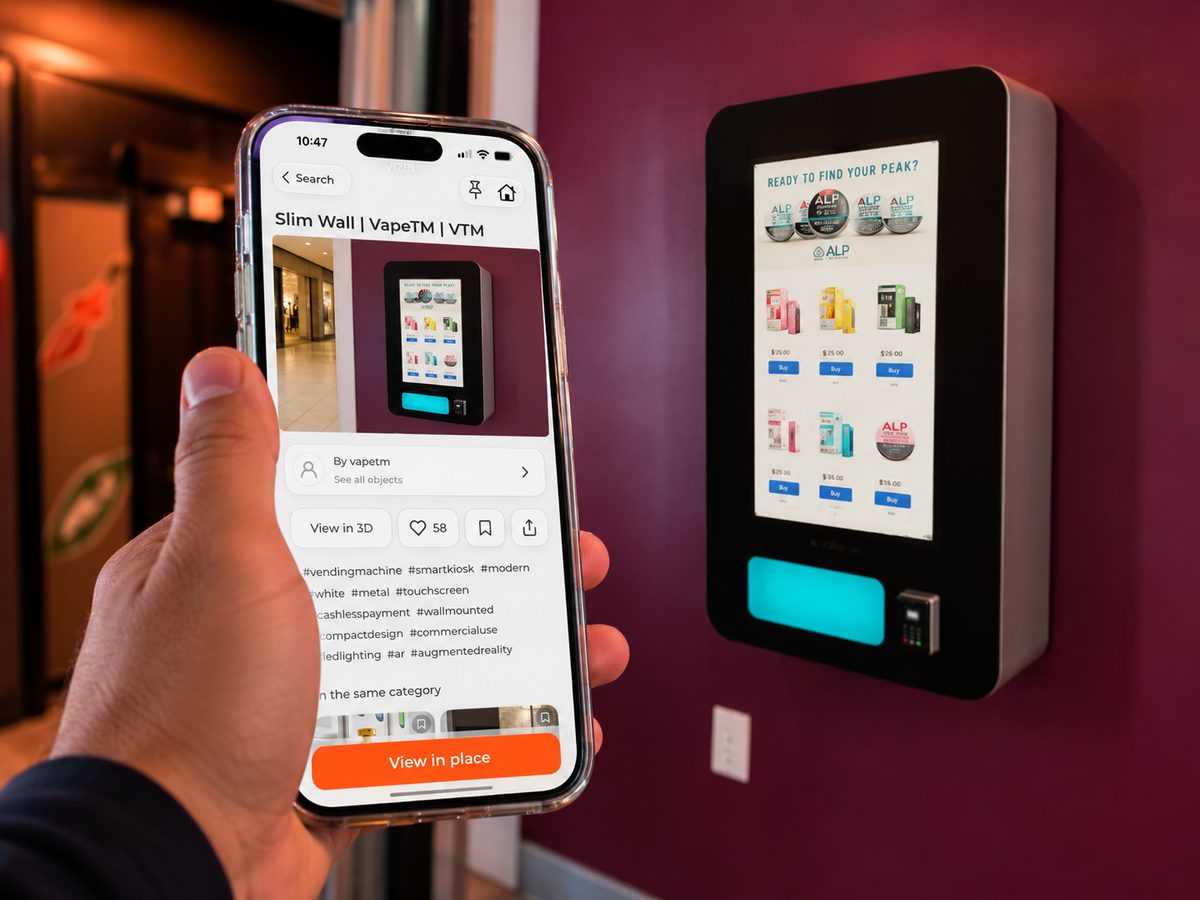
Photos and spec sheets made it hard for prospects to judge the real size and wall placement of VapeTM’s machines. Sales reps now open models on a phone or tablet, send them by link, and print QR codes on sales materials — wall tracking keeps each machine fixed to the wall.

“The ability for our customers to see exactly how our product would look in certain spots is priceless.”

Micah, VP Sales at VapeTM
No app
Runs in the browser — nothing for the buyer to install
3 surfaces
Floor, wall, and ceiling placement in AR
CAD → AR
Models built from your CAD files or photos
1 model
Delivered by link, QR code, or a branded iPad

Placement

Show the exact machine at true scale

Photos and dimensions don’t answer the question “will it fit here?”

Spec sheets show the machine; they don’t show how it occupies the site. Doorways, corridors, and the final spot keep raising doubts that stall the order.

Vizbl places floor-standing and wall-mounted models on the correct surface at true scale. Buyers preview the final position and spot access problems before delivery day.

Phone camera placing snack and coffee vending machines in an office lobby at true scale in AR

Configuration

Switch models, finishes, and layouts in place

When the first machine doesn’t fit the space, the next one should be a tap away.

A machine may feel too large for an entrance or too industrial for a hotel lobby. If the salesperson can’t show an alternative on the spot, the order stalls.

Buyers compare sizes, finishes, branded variants, and multi-machine layouts in the same AR scene. Each preview is a configuration you actually sell.

Wall-mounted and floor-standing vending machine variants previewed side by side in a lounge interior

Distribution

One model, every step of the sales chain

The person who sees the demo is rarely the person who signs.

One person sees the demo; someone else approves the location. By the time materials reach an owner or head office, the machine is back to a screenshot and dimensions.

Share the model by link or QR, open it from Vizbl during a meeting, or load the catalog onto a branded iPad — the machine survives every forward without losing scale.

A vending machine model opened from a shared link on a phone, viewed in AR with a buy button

From CAD files to a sales-ready catalog

Send CAD files or photos

Existing 3D or CAD assets are prepared for AR as they are. No CAD? Our team models the machines from photos and dimensions.

We build and optimize the models

Every model is tuned for phones and tablets: true-scale dimensions, correct floor or wall placement, finishes and branded variants you sell.

Your network gets the catalog

Sales teams, dealers, and operators open models from Vizbl, share them by link or QR, embed them on the website, or run a branded iPad in the field.

Photos or CAD files turned into a 3D vending machine model, published as a Vizbl catalog card with AR viewing

Got questions?

Who is this solution for?

Vizbl gives vending manufacturers and distributors an AR catalog their sales teams, dealers, and operators can use before purchase and installation. It works for floor-standing machines, wall-mounted units, smart coolers, kiosks, and micro-market equipment.

What types of machine placement can Vizbl show?

Models can be configured for floor, wall, ceiling, or flexible placement. Floor-standing machines stay on the floor; wall-mounted units attach to vertical surfaces. Recessed or integrated equipment may need a custom setup — and visualization does not prove that installation is technically possible.

Do we need to have 3D models of our machines?

Existing 3D or CAD assets can be prepared for Vizbl. If you don’t have them, our team creates and optimizes the models from photos and dimensions.

Can buyers switch between machine configurations?

Yes. Sizes, finishes, branded wraps, modules, and other variants can be added to a configurator and carried from 3D into AR. The scope depends on your product catalog and sales process.

How can our sales network access the models?

Open models from Vizbl, share them by link or QR, embed them on a website, or load the catalog onto a branded Showroom AR iPad.

Does Vizbl replace a site survey or installation check?

No. Vizbl shows visual scale, position, configuration, and appearance. It does not certify clearances, ventilation, power, structural mounting, safety, or compliance. Final measurements and installation requirements must be checked separately.

How does Vizbl integrate with an existing website?

Add a model as a 3D viewer, a combined 3D and AR experience, a direct AR button, or a QR code. The same model works in sales meetings and follow-up.

What does it cost?

Pricing depends on catalog size, model complexity, configurations, usage, distribution, and 3D asset preparation. Tell us about your catalog and sales process — we’ll recommend a setup and provide a quote.

Book a demo

Show where the machine will go before the order stalls

Tell us about your catalog and sales process. We’ll set up a demo with your machines and recommend a setup — no card, no contract. We respond within one business hour.

See our Privacy Policy.