
Vizbl update: three new products and a unified platform
August 4, 2026

Vizbl has been rebuilt as a unified platform with a new interface. The updated platform includes five dedicated workspaces: two existing products have moved to the new interface, and three are launching for the first time.
New products: Rugs, Flooring, and AI Try-On
Three new workspaces are launching today. None of them require 3D models — all you need to integrate is product photos and data from your catalog.
All three are available now — Rugs and AI Try-On are fully self-serve, and Flooring launches with help from our team.
Vizbl Rugs
Virtual try-on for rugs. The merchant uploads a top-down photo of the rug and enters its actual dimensions. Vizbl prepares the product for try-on — no separate 3D model needed.
Shoppers can view the rug in a pre-built interior scene, upload a photo of their own room, or place it on their floor in AR at true scale. If the rug comes in multiple sizes or colors, they can switch between options right inside the try-on.
Vizbl Flooring
Lets shoppers preview hardwood, laminate, tile, and other flooring materials in their space. Vizbl detects the floor boundaries and applies the selected material across the entire visible surface — accounting for scale, pattern direction, and perspective.
Shoppers can preview the material in a pre-built scene, on an uploaded photo of their room, or through their phone’s camera. If it comes in multiple colors or variants, they can compare them right inside the try-on.
Self-serve texture uploads aren’t available in the Flooring workspace yet. Submit a request in your dashboard — our team will prepare your products and help you launch the integration on your site.
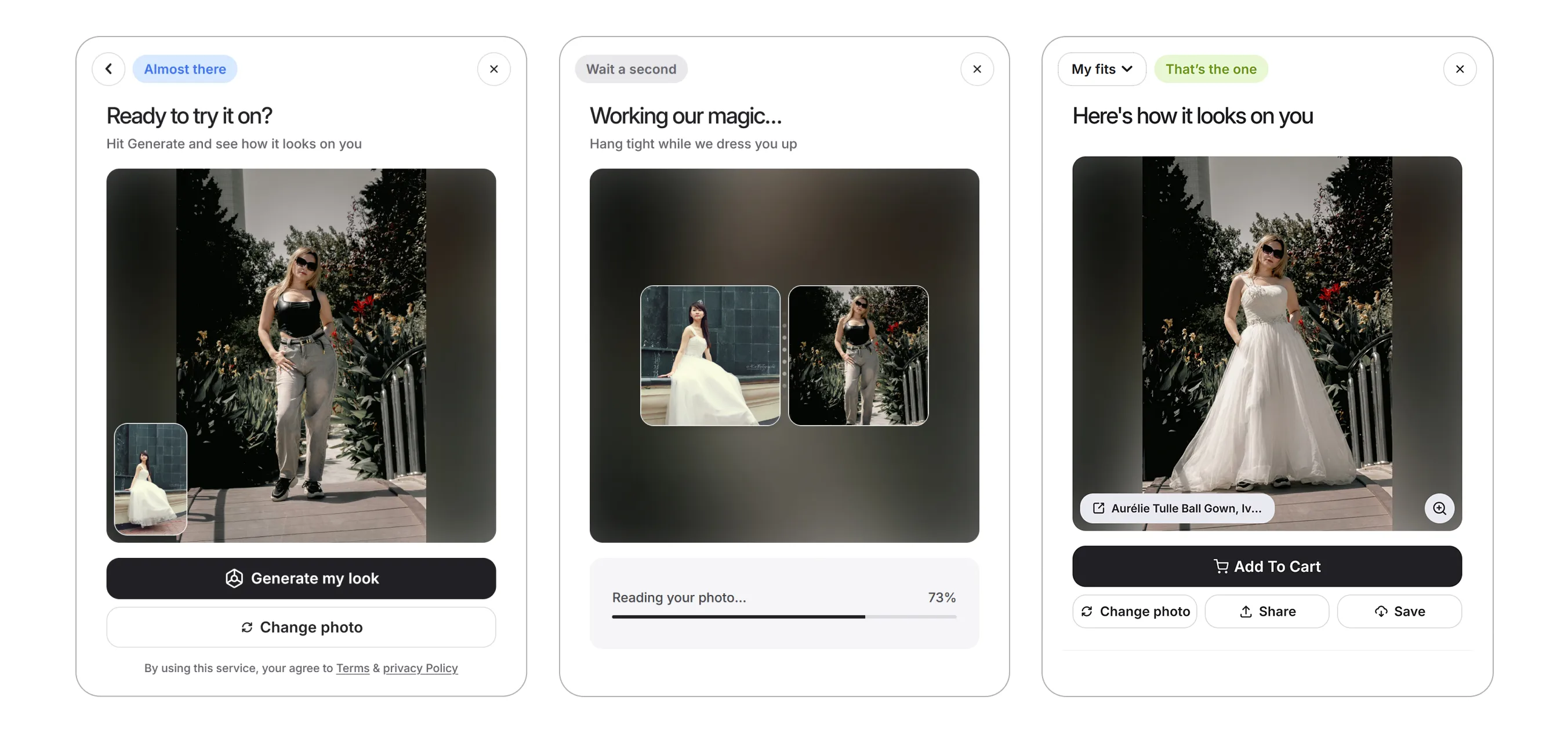
Vizbl AI Try-On
Virtual try-on for clothing, jewelry, glasses, watches, hats, and accessories.
The merchant adds product photos and details, and the shopper uploads a photo of themselves. Vizbl generates an image showing how the selected item looks on them. If the product comes in multiple colors or variants, shoppers can compare them on their own photo — without jumping between pages.
Core AR: integration without the manual work
Previously, users had to assemble the integration code manually from model data and locate the right IDs in the dashboard. Now you just select the integration type and the model you need — Vizbl generates ready-to-use code you can add to your site right away.
Users can also now download a QR code image linking to the AR view. Place it in showrooms, retail stores, print catalogs, and other offline materials.
Everything else in Core AR stays the same. Users can still:
- embed the 3D viewer on their site;
- add AR view to products;
- use multi-object AR view;
- upload and edit their own 3D models.
Vizbl Core AR adds interactive 3D viewing and AR try-on to your product pages. Shoppers can examine a product from every angle, then place it in their own space through their phone’s camera — at true scale, with no separate app to install.
It’s built for furniture, lighting, décor, and other products where looks and dimensions matter before purchase. Stores can embed a standalone 3D viewer, add an AR view button, or let shoppers arrange multiple products in a single scene.
Wall Art: updated interface
Wall Art’s core features and integration approach haven’t changed. The workspace has a new interface and is now part of the unified Vizbl platform.
Vizbl Wall Art shows shoppers how a painting, poster, photograph, or other wall décor will look in an interior before they buy. All the store needs to do is upload the product image, enter its actual dimensions, and add the ready-made widget to the site.
Shoppers can view the product in a pre-built interior scene, upload a photo of their own room, or try it on their wall in AR. In the interior scenes and on a room photo, size and framing options can be compared right inside the widget — no jumping between product pages.
A single account across all workspaces
All Vizbl products run as a single platform. You register once and move between Core AR, Wall Art, Rugs, Flooring, and AI Try-On under one account.
Billing now runs on tokens — a single balance that covers every workspace. Tokens are spent when shoppers use platform features: opening the widget, uploading a room photo, or starting a try-on. Your dashboard shows your balance and exactly what each token was spent on. The balance belongs to your account, not to any individual workspace.
For details on the token system and the cost of each action, see the guide in the Help Center.
Other platform changes
Detailed analytics. Each workspace has its own stats: how many times shoppers opened the widget, uploaded a photo, or started an AR try-on. Use them to track shopper activity and see which features get used most.
Security settings. Users can now enable two-factor authentication in the dashboard, view all active sessions, and end any of them remotely.
API keys. For advanced integrations, you can issue secret keys with configurable permissions: Read Only, Read & Write, or Full Access.
Domain-based integration protection. Vizbl integrations only work on sites added in the corresponding workspace settings. Your widget and connected products can’t be used on unauthorized domains.
What happens to the legacy workspaces
We’re planning a gradual migration of legacy workspace users to the updated platform. We’re currently working out the process and timeline.
Once the plan is ready, we’ll let you know in advance which data will be migrated automatically, whether any action will be needed on your end, and how the transition will affect existing integrations and subscriptions.