
3D furniture modeling services for ecommerce and AR
Our team turns your product photos, drawings or CAD into web-optimized, true-to-dimension 3D models with real materials and colour variants, delivered straight into your AR workspace. Sofas, chairs, tables, beds, storage and lighting, from one bestseller to a whole collection.
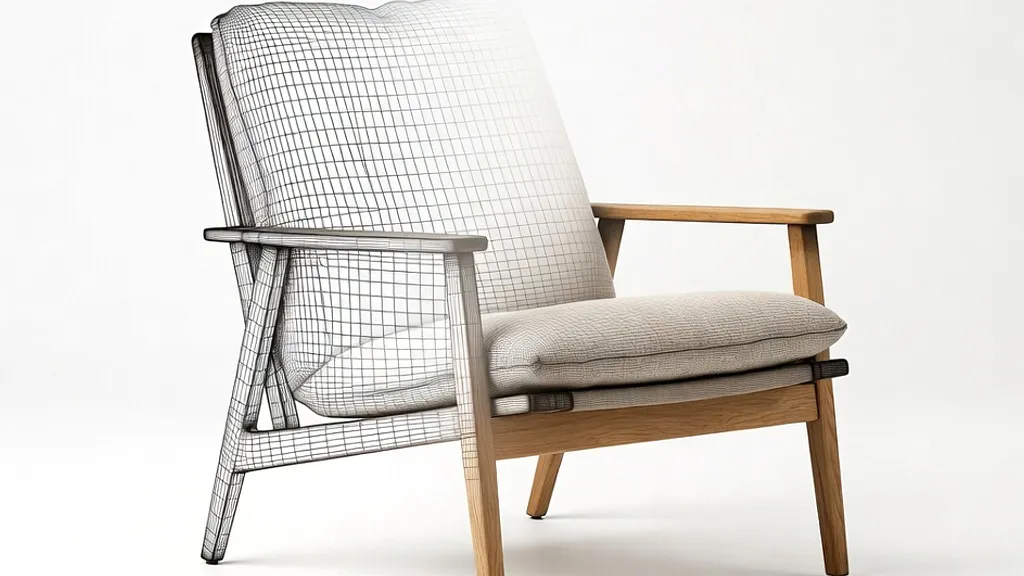
What a furniture model has to do on a product page
A 3D model made for a render and a 3D model made for a product page are different objects. The first can weigh two hundred megabytes and take a minute to light; the second has to open on a phone in seconds, turn smoothly, switch from oak to walnut, and stand on the shopper’s floor at exactly the right size. Vizbl’s modeling service builds the second kind, and builds it so the same file serves the embedded 3D viewer, the AR view, a shareable AR link and a QR code for the catalog.
What you get for every piece
Web-optimized geometry. Models are built to load fast on a phone and still hold up in a close-up: clean topology, sensible polygon budgets, LODs where a piece needs them. The same file works in the 3D viewer and in AR.
PBR materials from your finishes. Fabric, leather, wood, metal and glass are built as physically based materials from your swatches or photos, so the walnut looks like walnut in the shopper’s own light, not only in a studio render.
AR-ready and true to dimension. Every model is scaled to the real product dimensions and exported as GLB and USDZ, the formats iPhone and Android AR use. It is uploaded to your Core AR workspace ready to embed.
Variants and modules. Colour and material options are set up as switchable variants; modular collections are built so pieces combine in the viewer and in multi-item AR.
How an order runs
From a product list to live AR on your product pages.
01Send the products
A store link, a product list or a spreadsheet, plus photos, dimensions and finishes. CAD or existing models if you have them. Use the order form.
02Quote and schedule
We come back with a per-piece quote and a delivery schedule. Collections are batched so the first products go live while the rest are in production.
03Modeling and review
Each model is reviewed against the photos and dimensions; you check it in the 3D viewer and in AR on your own phone before it is approved.
04Delivery into your workspace
Approved models land in your Core AR workspace with variants configured. Add the button to the product page, or let the Shopify app link them to products.
Where the models go to work
One model, built once, used everywhere the product is sold.
Product pages
Embedded 3D viewer with variants; AR button for phones.
Catalogs and showrooms
Permanent AR links and printable QR codes on price tags and catalog pages.
Marketplaces and partners
GLB and USDZ files for retailers, marketplaces and design tools that accept 3D.
Room sets
Multi-item AR puts a sofa, table and lamp in one scene; modular pieces snap together.
Sales teams
The same catalog on iPad with Showroom AR for trade shows and client visits.
Why have Vizbl build the models
Built for the platform they run on. The team models for Vizbl’s viewer and AR every day, so polygon budgets, material setups and variant logic are right the first time, not after a round of fixes.
Dimensions are the spec. Every model is checked against the real product dimensions before delivery, because “will it fit” is the question the model exists to answer.
Two ways to scale. Bestsellers and complex pieces go to the team; long-tail SKUs can go through Photo to 3D in the same workspace, so a whole catalog gets covered without a per-piece studio budget.
Questions about furniture modeling
What do you need from us to model a piece of furniture?
Product photos from several angles (your catalog shots are usually enough), the dimensions, and the materials or finishes it comes in. If you have manufacturer CAD (STEP, IGES, SolidWorks exports) or an existing high-poly model, we start from that and optimize it for the web instead of modeling from scratch.
What do we receive?
A web-optimized model with PBR materials, scaled to the real dimensions, exported as GLB and USDZ, with colour and material variants set up as switchable options. It is uploaded into your Vizbl Core AR workspace, so the 3D viewer, the AR button, the AR link and the QR code are available immediately; you can also download the files for your own use.
How long does it take and what does it cost?
Both depend on the piece and the catalog: a simple side table and a tufted modular sofa with eight fabrics are different jobs. Send the product list or a store link through the order form and we reply with a quote and a schedule. Most stores start with bestsellers and extend from there.
Can we do it ourselves instead?
Yes. Photo to 3D generates a model from a few product photos in about 15 minutes, paid in tokens, and is a good fit for simpler pieces and for testing. The modeling team is for pieces that need exact geometry, specific materials, modular logic or a consistent look across a large collection.
Will the models work outside Vizbl?
Yes. GLB and USDZ are open formats; the same files work in other viewers, in Shopify’s native 3D field, in renders and in design tools. Using them in Vizbl adds the browser AR, the variants, multi-item AR, QR codes and hosting.
Do you also model lighting, decor, fireplaces or equipment?
Yes. Furniture is the most common request, but the same team models lighting, fireplaces, saunas, fitness and playground equipment, vending machines and automotive parts; see 3D modeling services for the general page.
Get your furniture modeled for 3D and AR
Send a product list or a store link; we reply with a quote and a schedule. Every Vizbl account starts with 1,000 free tokens for the AR itself.