
What Are Object Collections and How to Use Them
Organize and display related objects in Vizbl using Collections.
Object Collections help you group and organize related objects on the Vizbl platform.
This guide explains what they are, how they differ from categories, and how to make the most of them.
What Are Object Collections?
Collections are a tool for organizing the objects you’ve uploaded to Vizbl.
They help you group related items, such as furniture series or modular product systems.
This makes it easier for clients to see which pieces belong to the same set or share a consistent design style.
Key Features:
- Only Premium objects can be added to collections.
- Each object can belong to only one collection.
- When viewing an object in the Vizbl mobile app or in Multi-item AR*, other objects from the same collection are automatically displayed.
* Multi-item AR lets users try multiple objects in augmented reality at once. Learn more about this feature.
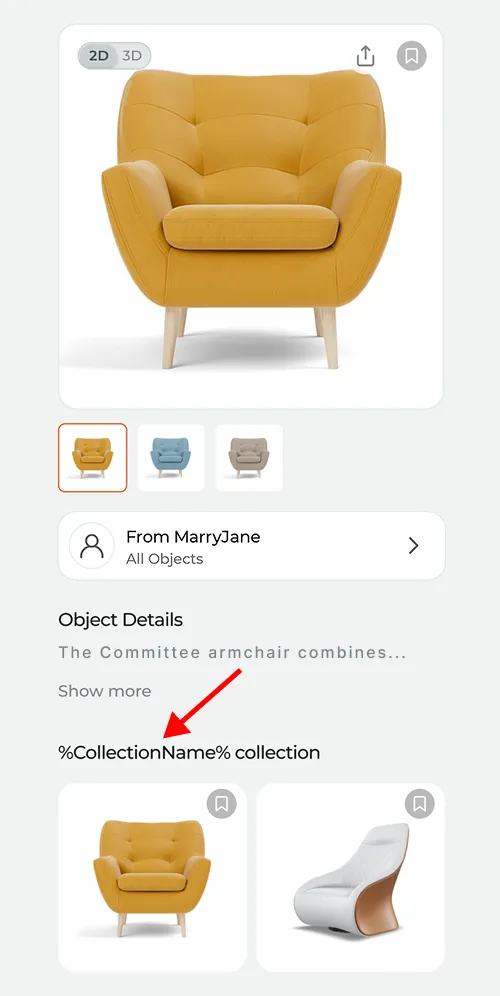
Objects from the same collection are shown below the selected item.
You can manage collections in your Vizbl account under the Premium Objects section.
For detailed instructions, see step-by-step guide: How to create and edit object collections.
Collections vs. Categories
In addition to collections, the Vizbl platform also includes categories, another way to organize your objects.
Here’s how they differ:
Feature
Collections
Categories
Purpose
Group related objects
Organize your catalog
Examples
“Bedroom Set,” “Sofa Modules”
“Furniture,” “Décor,” “Appliances”
Unique Rules
Each object can belong to only one collection
An object can belong to multiple categories
Available Objects
Premium only
Basic and Premium
Setup Location
Premium Objects section
Catalog section
How to Use Object Collections
Use collections to group objects that:
- Belong to the same series or set (e.g., modular sofa sections)
- Share a consistent design style (e.g., a loft-style dining table and chairs)
- Are designed for the same room or space (e.g., a bedroom set)
Example Collections:
- “Sofa Modules” — straight or corner sections, armrests, and backs
- “Loft-Style Dining Set” — dining table and chairs
- “Bedroom Set” — bed, wardrobe, and nightstand
Summary
Object Collections make it easy to create unified groups of related products in Vizbl.
They help clients explore your catalog more easily, understand how pieces fit together, and visualize cohesive design sets.